

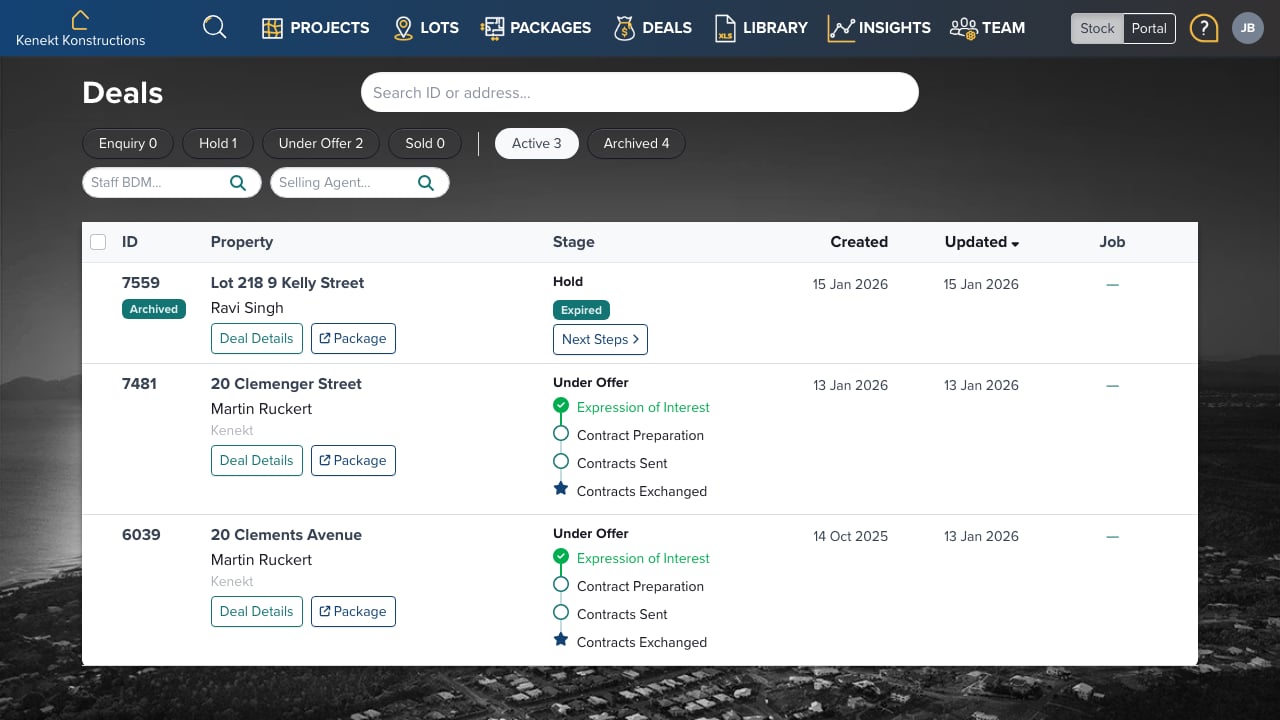
The Deals Page (/deals)
The Deals page is your central hub for managing all agency deal activity:- Enquiries: Initial buyer interest
- Holds: Packages reserved for buyers
- Under Offer: Contracts being negotiated
- Sold: Completed sales in construction/settlement
Viewing Deals
Filter deals by:- Your Staff: See deals managed by specific BDMs
- Selling Agent: See deals by the agent who brought the buyer
Main Package Statuses
Placing a Package On Hold
- Click the status button on a package
- Select Hold
- Choose the agent who requested the hold
- Set the hold duration
- Confirm
- The agent receives an email alerting them of the hold and duration
- The Lot status changes to On Hold
- Other packages on the same lot show “linked hold” status
- When the duration expires, the package automatically returns to Available
Status Cascade Behaviour
Prerelease Inheritance
Setting a Project to Prerelease:- New Lots created under the project inherit Prerelease status
- New Packages created under those lots inherit Prerelease status
- Existing lots and packages are not changed
On Hold Cascade
When a package goes On Hold:- The Lot shows On Hold status
- Other packages on the same lot get “linked hold” status
- When released, linked packages return to Available
Under Offer / Sold Cascade
When a package goes Under Offer or Sold:- Other packages on the same lot are archived
- This ensures only one package shows the correct status per lot
- Preserves data integrity for reporting
Archive Cascade
When archiving a Project:- All Available lots and packages are archived
- Sold packages are preserved (not changed to archived)
- This maintains historical sales records
Milestones
Below the main statuses, Kenekt uses milestones to track detailed workflow progress.Configuring Milestones
- Navigate to /sales/deal_stages
- Add or edit milestone stages
- Configure email alerts for each milestone:
- Alert the BDM when milestone is achieved
- Alert the Selling Agent when milestone is achieved
Under Offer Milestones
Track progress through the offer stage:- Contract issued
- Finance approved
- Building approval
- Exchange scheduled
- etc.
Sold Milestones
When moving from Under Offer to Sold, a new set of milestones becomes available:- Construction commenced
- Frame stage
- Lock-up stage
- Practical completion
- Settlement
- etc.
Agent Visibility
Agents can track milestone progress on their /my-deals page in the portal. This provides:- Visual progress indication
- Clear communication of deal status
- Transparency without manual updates
Deal Actions
Click any deal row to open the sidebar with:- Stage progression: Move to next milestone
- Milestone dates: Track expected and actual dates
- Commission job details: View fee tracking
- Quick actions: Convert, archive, reassign
Commission Jobs
Kenekt has a full Job payments management system linked to Deals for tracking commission payments through construction stages. Note: This feature documentation will be added when available.Best Practices
- Set realistic hold durations: Match your typical sales cycle
- Use milestones consistently: Keeps agents informed automatically
- Configure email alerts: Reduce manual follow-up communication
- Review stalled deals: Use filters to find deals needing attention