

Who can see it
Administrators and staff. Agents do not see the tab and cannot reactivate an address. The list shows addresses belonging to users in your agency. Addresses with no account behind them are not shown.Finding the list
1
Open Team
Go to Team in the main navigation.
2
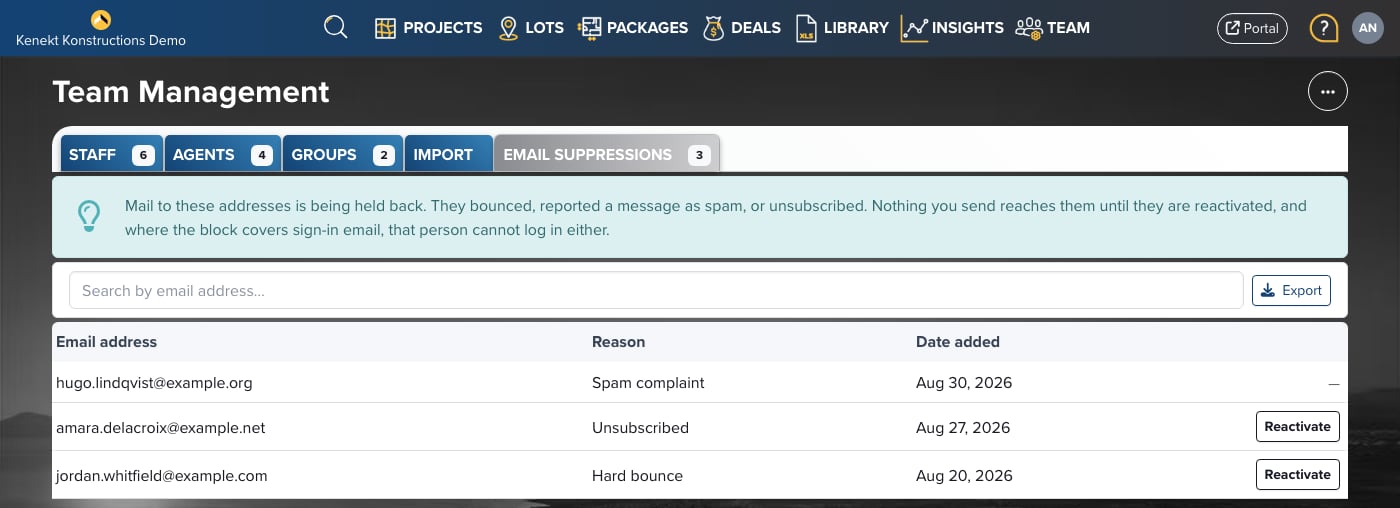
Open the Email Suppressions tab
The tab sits after Import. The number on the tab is how many addresses
are currently blocked.
Reading the list
Use the search box to find an address. The list is sorted with the most recent
block first.
Reasons
- Hard bounce: the mail server rejected the message permanently. Usually a typo in the address, or a mailbox that has been closed.
- Spam complaint: the recipient told their mail provider the message was junk.
- Unsubscribed: the recipient used the unsubscribe link in one of your emails.
Reactivating an address
1
Find the address
Search for it, or click the Email suppressed badge on the person’s row.
2
Click Reactivate
The button appears at the end of the row on any address that can be
reactivated.
3
Confirm
Confirm you want to email the address again. It disappears from the list and
normal sending resumes.
Fix the cause first
Reactivating only clears the block. It does not fix what caused it.- Hard bounce: correct the address on the person’s profile before reactivating, otherwise the next message bounces and the block returns.
- Unsubscribed: only reactivate when the person has asked you to start emailing them again. Reactivating an unsubscribe without being asked will earn you a spam complaint, which is permanent.
Unsubscribes on a profile
Open a person’s profile and you see their email status directly:- An Unsubscribed notice with the date, and a Reactivate button. Sign-in links and account email still send to someone who has unsubscribed. Only your bulk and marketing email stops.
- A Kenekt can’t email this address panel when the address is bounced or marked as spam, showing the reason and the date.