

Setting Up Kenekt as Your Bulk Uploader
Before you can list packages through Kenekt, you must designate Kenekt as your bulk uploader with REA.Steps
- Log into your RealEstate.com.au Agent Admin account
- Navigate to XML Uploads in the left menu
- Click the green Change my uploader button (top right)
- Choose Leads and Reporting from the dropdown menu
- Enter Kenekt Group PTY LTD as the new provider
- Complete and submit the form, specifying your go-live date
After Submission
REA sends a confirmation email with a ticket number. Forward this ticket to team@kenekt.com.au so we can coordinate with REA on your behalf.Configuration in Kenekt
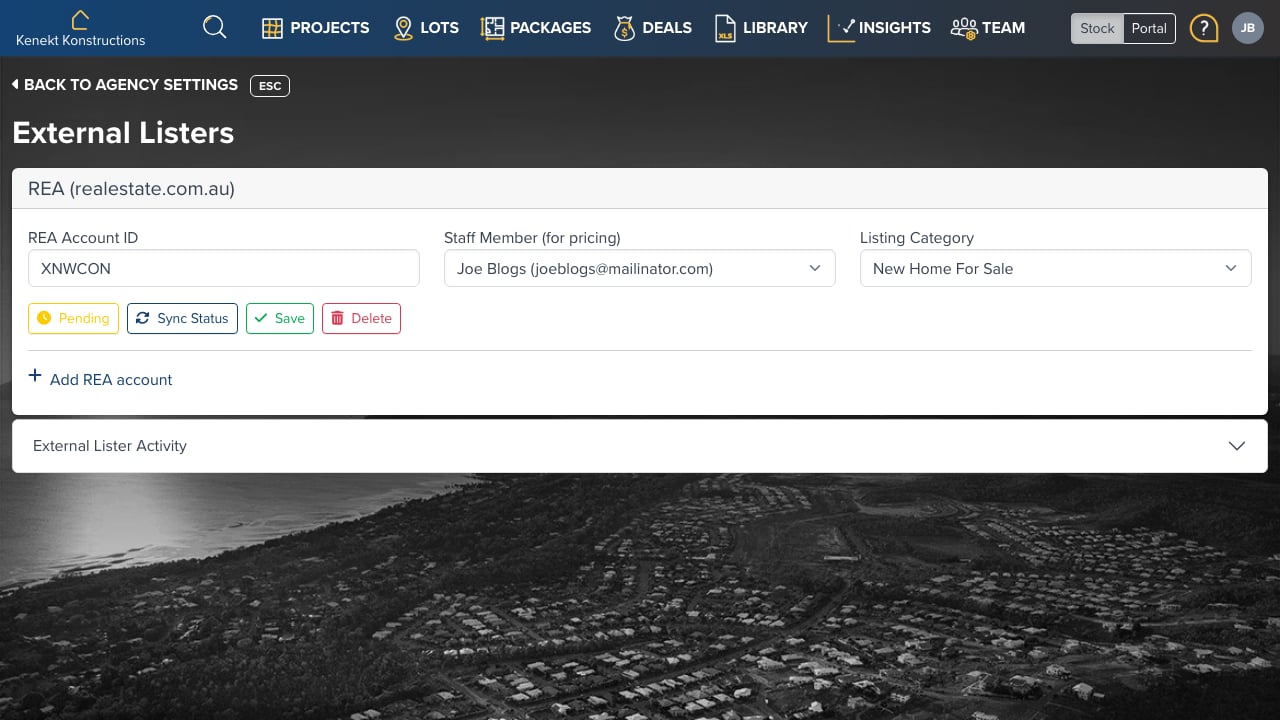
Once your bulk uploader is set up, go to Agency Settings → Connectors → REA:- REA Account ID: Your realestate.com.au account identifier (provided by REA)
- Staff Member (for pricing): Select which user’s pricing view to use for listings
- Listing Category: Choose the listing type (e.g., “New Home For Sale”)
Sync Status
- Pending: Changes waiting to be synced
- Sync Status: Check the current sync state with REA
Pushing Properties to REA
To push properties to REA:- Open a package
- Go to the Distribution Page
- Enable REA listing
- Confirmation or error notifications arrive via email