

Enquiring on a package
- Browse to a property on the portal.
- Click Enquire in the package’s row, at the bottom of the property drawer, or on the detail page.
- Answer the questions and click Send enquiry.
- What would you like to know?
- Buyer’s approved purchase amount
- Is the buyer’s finance ready? Yes, No, or Maybe
General Enquiry (sourcing brief)
Use General Enquiry in the top navigation when you want the team to find packages for a buyer rather than asking about one listing.- Click General Enquiry in the navigation.
- Your enquiry and The buyer: answer the buyer questions below. A General Enquiry also asks for the buyer’s budget, under the financial status (see Budget).
- The property: pick the property configuration, then add localities, land and build size, and land facing. Marketplace portals also ask for the target states.
- Final details: optionally pick a contract type and ideal registration date (or No preference), add any notes, and click Send request.
The buyer questions
Your enquiry
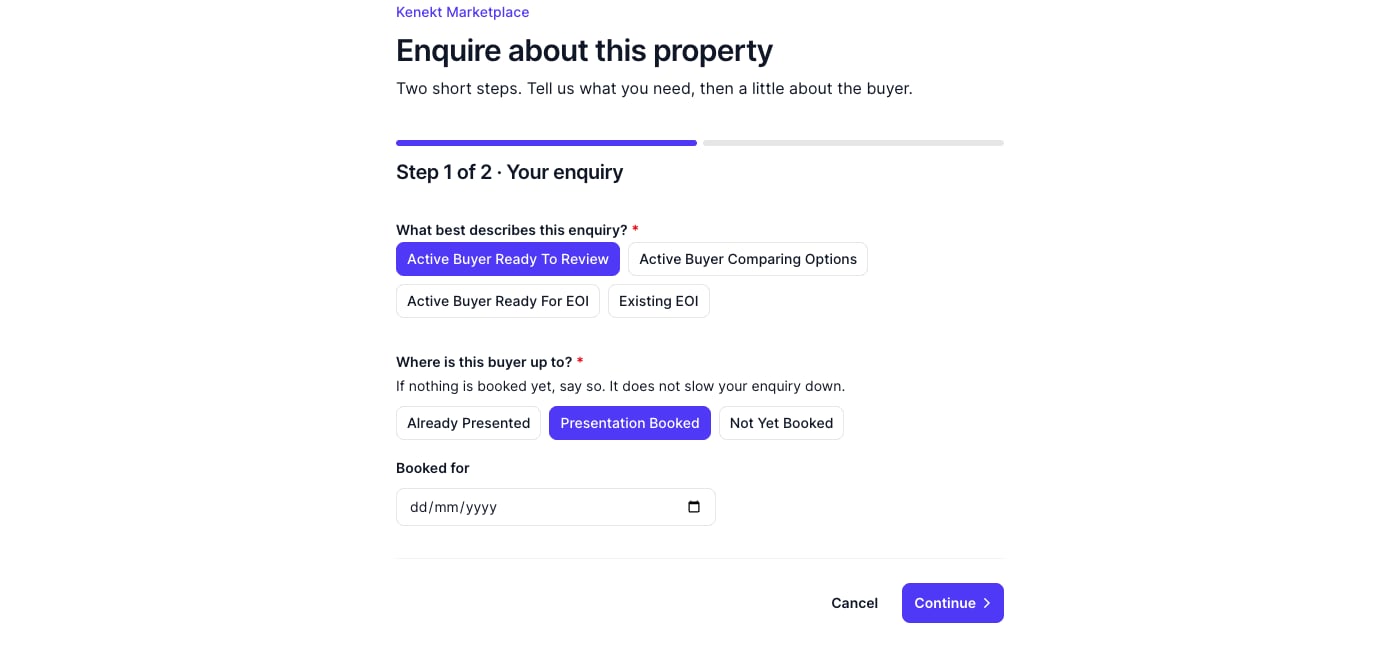
The first step: the enquiry type and where the buyer is up to
If you choose Already Presented or Presentation Booked, you can add the date. If nothing is booked yet, say so: it does not slow your enquiry down.
The buyer
A General Enquiry has no property yet, so it skips the positioning question.
Some finance answers ask a follow-up. These details are optional, but they are what lets the team hold a lot with the builder, so copy them straight off your file.
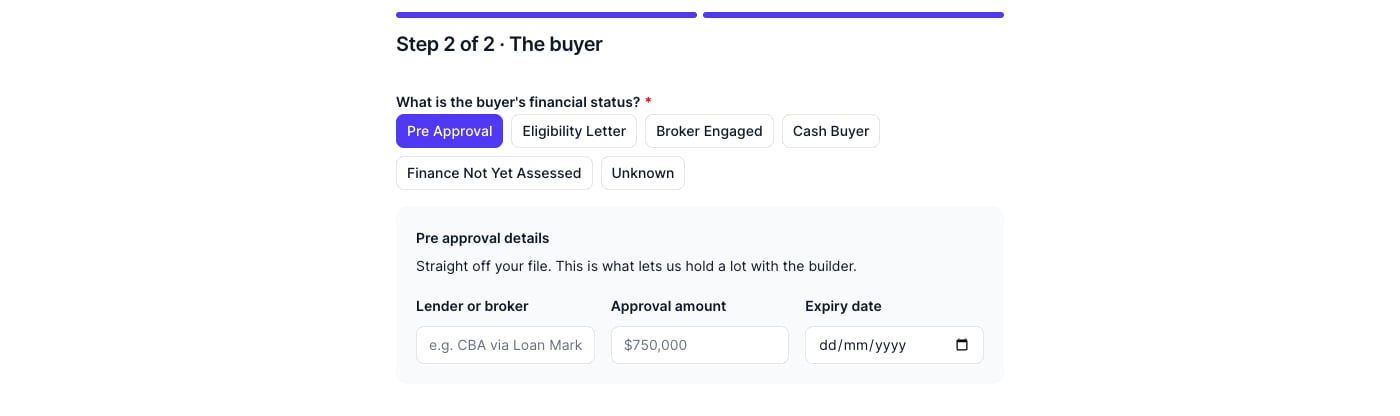
Choosing Pre Approval asks for the approval details
Budget
On a General Enquiry, the budget question appears in the same grey box as the finance details, for every status except Pre Approval (the approval amount already covers it). It is required whenever it shows.What happens next
- The team receives an email with your answers and notes.
- An enquiry appears in your My Deals, with a badge showing the enquiry type you chose.
- The team may contact you for more details.
- The deal can progress to Hold, Under Offer, or Sold.
Viewing your enquiries
Open My Deals and click an enquiry to see everything you submitted, including the finance details and, on a General Enquiry, the sourcing criteria.Tips
- Answer the buyer questions honestly. Unknown is better than a guess, and the team reads your answers to decide what to work on first.
- Include a realistic budget so the packages suggested actually fit.
- Check My Deals regularly for responses.